Instead of manually copying your weight and activity into separate logs, use Apple Health to collect those measurements and prepare a consistent summary for your GLP-1 appointments. This 2026 workflow connects your progress records—not your medication dosing—to physician-led care.
TL;DR
- Apple Health GLP-1 weight loss tracking organizes weight and activity; it does not determine medication doses.
- Palm Med Wellness provides physician-led medical weight loss care; Apple Health supplies records for clinical discussion.
- Check measurement sources before interpreting weight trends or sharing a progress summary.
- Keep medication changes and symptoms in a separate log for your prescribing clinician.
Why this matters
Apple Health is a recordkeeping tool, not a GLP-1 treatment plan. A weight entry tells you what the scale measured. It does not explain whether a change reflects treatment response, hydration, illness, or another factor.
Palm Med Wellness provides physician-led medical weight loss care for patients seeking GLP-1 treatment in Palm Beach County. Pairing your records with clinical review keeps tracking separate from prescribing decisions. Learn about the clinic through Palm Med Wellness.
For your 2026 tracking setup, prioritize consistency over collecting every available measurement. Weight, activity, and a separate symptom record give your appointment a clear starting point without turning your phone into a medical decision-maker.
Before you start
- Access: Have your iPhone, the Health app, and access to any scale or activity app you intend to connect. An Apple Watch is optional; you can enter weight manually.
- Materials: Gather your recent weight records, current medication instructions, and the dates of any clinician-directed treatment changes. Use a private note or the communication method your clinic recommends for symptoms.
- The gotcha: Permission to write data into Apple Health does not mean an app or scale has actually transferred readings. Confirm that a new measurement appears in Health before depending on automatic collection.
Apple Health can organize compatible measurements, but this guide does not establish an automatic connection to your clinic. Do not assume your prescribing clinician receives an alert when you add a weight reading or record a concern.
Choose your weight-entry method
Use the method you can maintain accurately. Neither approach measures medication effectiveness on its own.
Manual entry in Apple Health
- Best for: People using a scale without a connected app
- Advantage: You control the measurement date and value
- Limitation: Typing creates opportunities for date or unit errors
- Verification: Compare the saved entry with your scale reading
Compatible scale-app connection
- Best for: People whose scale app supports Apple Health
- Advantage: Transfers readings without retyping
- Limitation: Permissions, account selection, or syncing failures can interrupt transfers
- Verification: Check that the reading appears under Weight
Choose one primary weight source. If you also keep a backup record, label it clearly rather than treating duplicate entries as additional measurements.
Weight record setup
These instructions use Apple's Health labels. Depending on your iOS version, category navigation appears under Browse or Search. Open the category named below; do not select a similarly named metric such as body fat percentage.
- Open Health, then open Browse or Search.
- Select Body Measurements, then Weight. You can also search for Weight within Health.
- Tap Add Data.
- Enter the measurement, confirm the unit, and set the date and time to when you weighed yourself.
- Tap Add, then check that the saved entry matches your original reading.
If you are entering older records during your 2026 setup, preserve their actual measurement dates. Entering several past measurements with today's date makes the timeline misleading, even when every weight value is correct.
Use the same scale and similar conditions when practical. Follow your clinician's advice about weighing frequency, especially if frequent weighing causes distress. More entries are not automatically better records.
For a simple organizational routine, choose 1 review day per week. That is a suggested time to check your records, not a prescription to weigh weekly or change treatment weekly.
Expected result: The Weight page contains a correctly dated measurement in the intended unit. You can distinguish a newly entered reading from a backfilled record.
Data-source configuration
A connected scale needs its own supported connection to Apple Health. Owning a Bluetooth scale does not, by itself, establish that connection.
- Open the scale manufacturer's app and find its documented Apple Health connection settings. Follow that app's instructions rather than guessing at a universal button name.
- Grant permission to write weight when the app requests Health access. Keep unrelated permissions off unless you have a reason to use them.
- Take a new measurement according to the scale's instructions, then open Health and return to Weight.
- Open Show All Data to inspect the saved readings. Select the relevant entry to check its details and source.
- Review Data Sources & Access on the Weight page to see which sources contribute to that measurement category.
If both your scale app and your manual entry contain the same measurement, inspect the records before deleting anything. Remove only an entry you have confirmed is incorrect or duplicated; retain the legitimate reading.
A connection's advantage is less typing. Its limitation is silent failure: a reading can remain in the scale app without appearing in Health. Check the transfer after setup and after changing phones, apps, or permissions.
Expected result: A new scale measurement appears in Apple Health with the expected date, unit, and source. If it does not, keep manual entry as your primary method until the connection works.
Activity and symptom records
Activity adds context to a weight timeline. It is not a substitute for information about food intake, medication tolerance, or medical conditions.
- In Health, open Browse or Search, then select Activity and Steps.
- Inspect the chart for missing periods. Keep your phone-carrying habits in mind when interpreting step records; a phone left behind cannot represent all your walking.
- Check Data Sources & Access if you use more than one device. Investigate an unexpected change in the source before treating it as a change in your activity.
- Create a private symptom log outside the weight chart using the method your clinician recommends.
- Give each symptom entry 3 fields: date, symptom, and effect on eating or drinking. Add medication timing when relevant to the discussion.
Record observations rather than assigning a diagnosis. For example, describe nausea and whether you could finish a meal instead of writing that your medication is too strong. Your prescriber needs the observation to assess the cause and next step.
Do not copy sensitive health information into an unfamiliar tracking app just because it offers a convenient dashboard. Review what the app collects and shares before connecting it.
Expected result: You have an activity record with identifiable sources and a separate, dated symptom log. Neither record automatically triggers a medication adjustment.
Appointment-summary preparation
The useful output of Apple Health GLP-1 weight loss tracking is a readable summary, not a larger pile of measurements. Prepare the summary before your follow-up, using the reporting period your clinician requests.
- Review weight. Open Weight and examine the period relevant to your appointment. Check dates, units, and unusual entries against the original records.
- Check sources. Identify whether the measurements came from manual entry, a scale app, or both. Flag gaps rather than filling them with estimates.
- Summarize symptoms. Include symptoms that affected eating, drinking, or daily activities, alongside clinician-directed medication changes.
- Prepare questions. Ask what the pattern means, whether your monitoring needs to change, and when to contact the clinic between appointments.
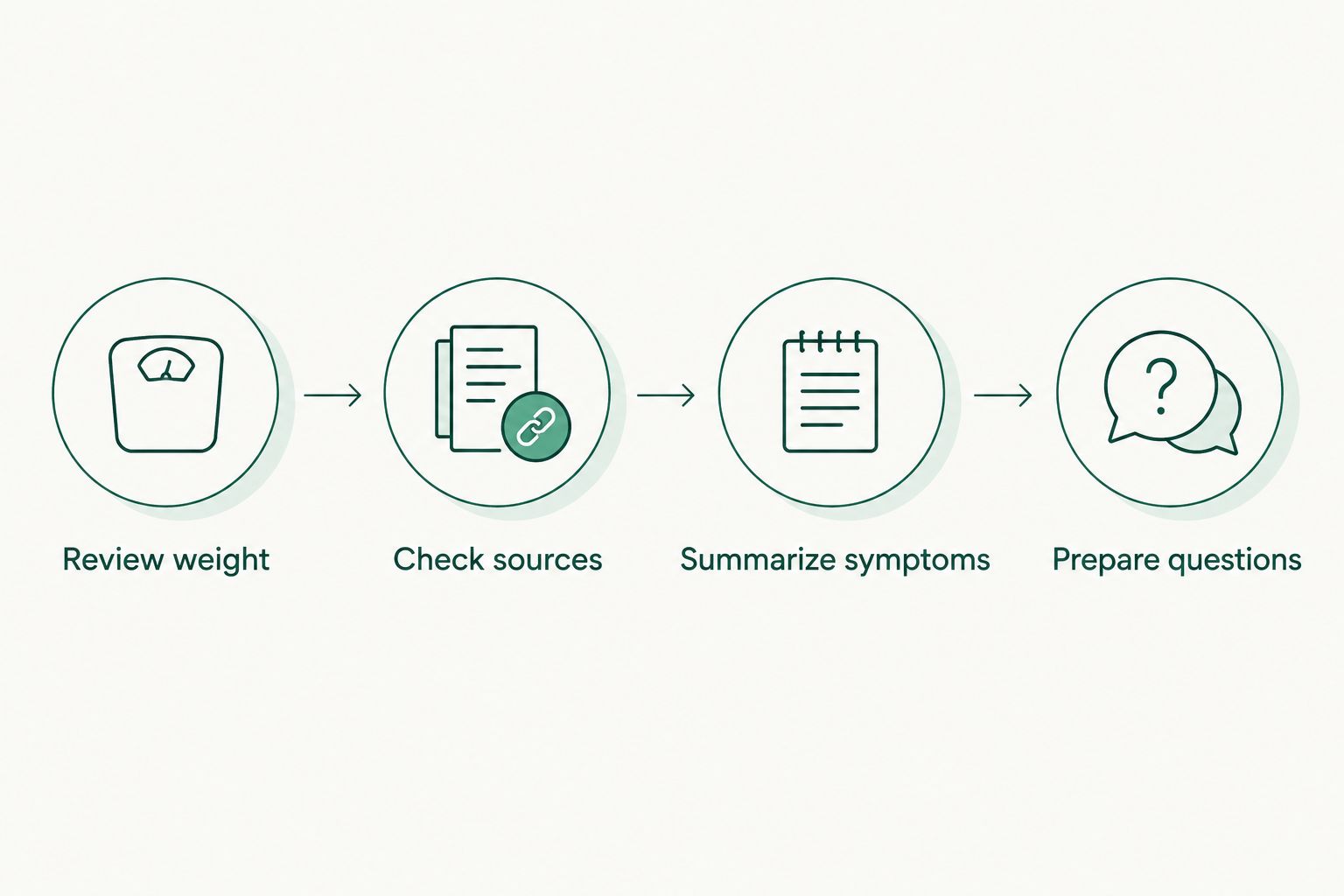
Check the records before asking your clinician to interpret the pattern.
If your clinician has not specified a reporting window, ask which period is useful. A 4-week summary is an organizational example, not a standard for judging whether GLP-1 treatment is succeeding.
Write the summary in plain language: which dates it covers, whether records are missing, and which concerns you want addressed. Avoid declaring a plateau from a single reading or estimating measurements you did not take.
Ask the clinic how it wants to receive your information. A screenshot is convenient but can omit source details; a full export contains more information than a clinician necessarily needs. Send only what is requested through the agreed channel.
Expected result: You have a dated summary with traceable measurements, symptom context, and specific questions. Your clinician—not the chart—decides whether treatment needs to change.
Update the summary when treatment changes
The adjacent workflow is event-based rather than appointment-based: update your notes whenever your clinician changes treatment instructions.
Record the date and the instructions exactly as given. Keep earlier entries so the timeline remains understandable, and mark the change beside the relevant reporting period. Do not overwrite your history with the new instructions.
For a 2026 follow-up, this lets you distinguish measurements recorded before and after the change without claiming that the change caused every difference. Weight trends alone cannot establish that relationship.
Best for: Patients who need an accurate timeline across clinician-directed treatment changes. The benefit is clearer context; the limitation is that the record still requires medical interpretation.
A missed dose is a different issue. Follow your medication's instructions or contact your prescribing clinician or pharmacist; do not use your weight chart to decide whether to take an extra dose.
Troubleshooting
A scale reading never reaches Apple Health
First confirm that the measurement exists in the scale app under the correct account. Check the app's Health permissions and its connection instructions, then look for the reading under Weight. Enter the measurement manually if needed, preserving its original date and unit.
The weight chart shows an unexpected jump
Inspect the underlying entry before interpreting the chart. Check for a pounds-versus-kilograms mistake, a typing error, the wrong date, or a measurement belonging to another household member. Correct a verified recording error; do not delete an accurate reading simply because it is unexpected.
Steps drop after a device change
Check the source and whether you carried or wore the recording device as usual. A recording gap is not proof that your activity fell. Label the gap in your summary rather than inventing replacement step counts.
You feel unwell despite an improving weight trend
Symptoms take priority over the chart. Contact your prescribing clinician about persistent vomiting, difficulty maintaining fluids, or other concerning symptoms. Seek urgent medical care for severe or persistent abdominal pain, especially with vomiting, or signs of a serious allergic reaction.
Your clinician cannot see the new records
Adding information to Apple Health does not establish delivery to your clinic. Confirm the agreed sharing method and send the requested summary. For urgent concerns, contact the clinic or appropriate emergency service directly instead of waiting for someone to review a shared record.
Customize your workflow
Keep the 2026 workflow small enough to maintain. Add another measurement only when it helps answer a question you and your clinician have identified. A crowded dashboard can obscure the records that matter to your appointment.
If weight tracking creates anxiety or compulsive checking, discuss a different monitoring approach with your clinician. You do not need to inspect every chart every day to participate in your care.
Palm Med Wellness's physician-led GLP-1 care and Apple Health tracking serve different roles: the clinic provides medical assessment, while the app organizes compatible records. Keep that boundary clear when choosing what to track and what to share.
FAQ
Can Apple Health track my GLP-1 weight loss?
Apple Health can record weight and activity during GLP-1 treatment. It does not determine whether the medication is appropriate, explain every weight change, or set your dose.
Does Apple Health automatically send my weight to Palm Med Wellness?
Do not assume Apple Health sends your weight to Palm Med Wellness. Ask the clinic which records it wants and which communication method to use.
Do I need an Apple Watch for GLP-1 progress tracking?
No, you can enter weight manually in the Health app on your iPhone. An Apple Watch is optional, and a connected scale needs its own compatible app and permissions.
What's better, manual weight entry or a connected scale?
Manual entry is best when you want a simple record without a scale-app connection; a compatible connected scale is best when you want to reduce typing. Both methods require checks for dates, units, and incorrect entries.
How often should I weigh myself while taking a GLP-1 medication?
Follow the weighing schedule agreed with your prescribing clinician. Keep measurement conditions consistent, and discuss an alternative if frequent weighing causes distress.
Can I change my GLP-1 dose if my weight stops falling?
Do not change your GLP-1 dose based on an Apple Health chart. Bring the trend, symptoms, and medication history to your prescribing clinician for assessment.
What should I bring to a GLP-1 follow-up appointment?
Bring a dated weight summary, your current medication instructions, relevant symptoms, and your questions. Include recording gaps and source changes so your clinician can interpret the information accurately.
One last thing
A missing measurement is more useful than a guessed measurement. An honest gap tells your clinician where the record ends; a fabricated entry disguises uncertainty as evidence.
Keep your 2026 progress log accurate, then use it to start a medical conversation. Call Palm Med Wellness or book a consultation to discuss physician-supervised medical weight loss and the records to bring.
Discuss your weight loss care
Bring your weight records and questions to a physician-led medical weight loss consultation.